Reclaim your disk.
Kill the cruft.
A developer machine accumulates build output the way a workshop accumulates
sawdust. A target/ here, a node_modules/ there, a
build/ in every app — none of it precious, all of it invisible,
and collectively tens of gigabytes. Kruftle finds every project under a folder,
works out what built it, and asks that toolchain to clean up after itself.
Free software under the GPL-3.0-or-later. No account, no subscription, no server. It runs entirely on your machine.
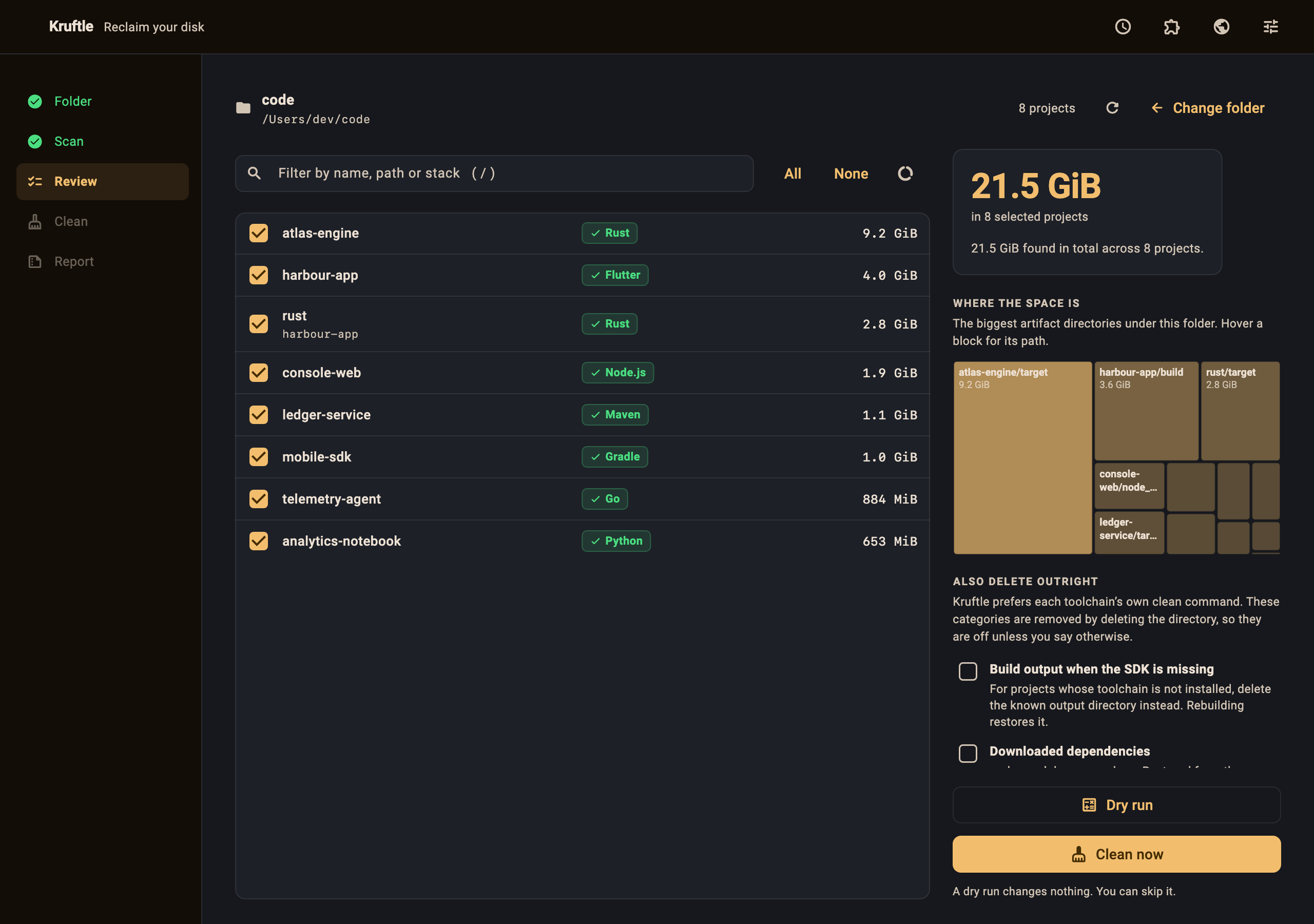
It runs the tool's own clean command
Because rm -rf on a guessed directory name is how people lose work.
cargo clean knows which files in target/ are Cargo's.
A shell glob does not. Kruftle asks each toolchain to clean up after itself,
and reports what was actually freed rather than what was predicted.
It only ever deletes a directory outright when three things are true at once: the SDK for that project genuinely is not installed, the directory name is on that stack's own allow-list, and you have ticked a box saying so — for that run, not for ever.
Five steps, and you can stop at any of them
Nothing is touched until you have seen it, selected it and confirmed it.
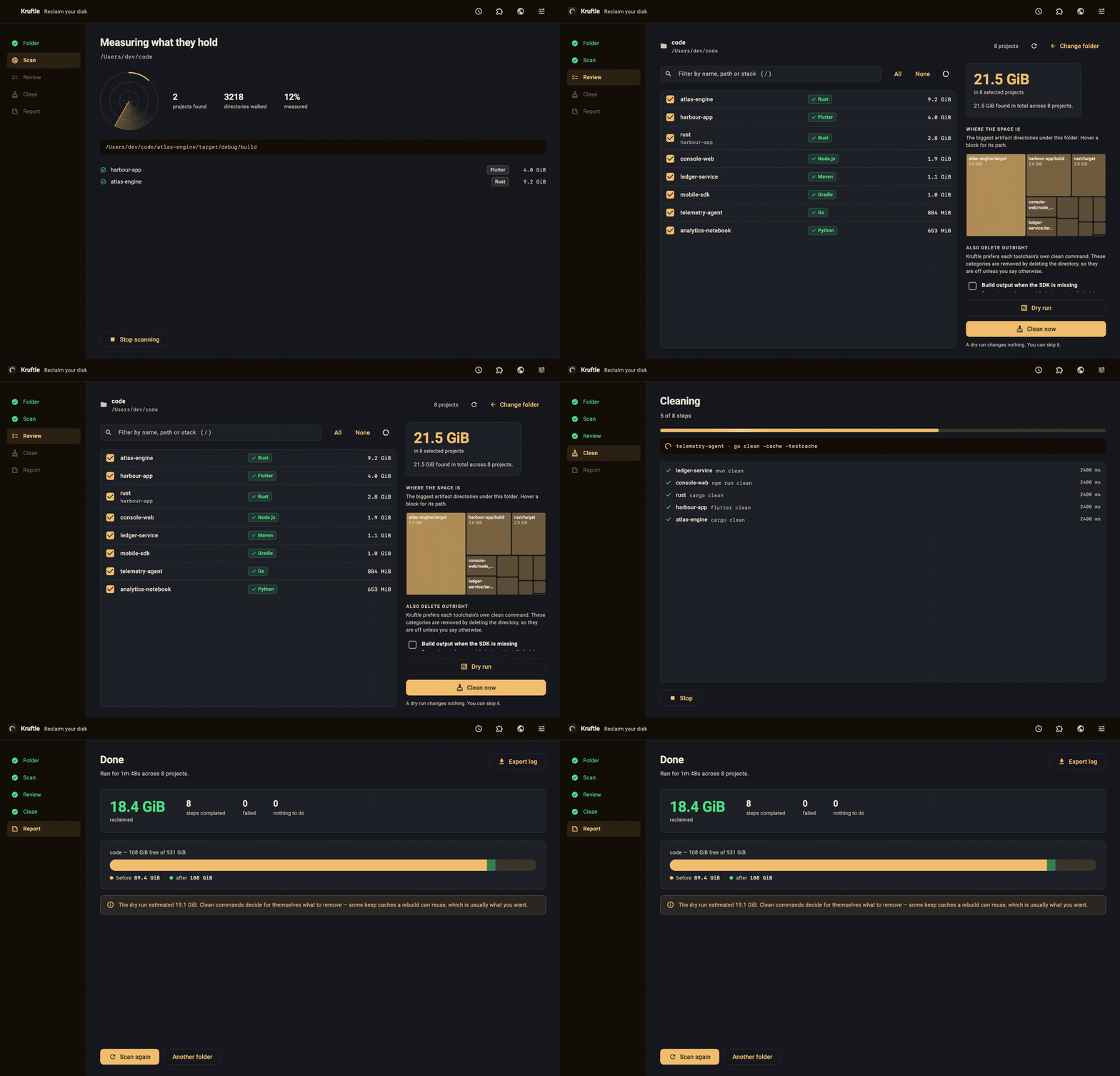
Point it at a folder
Choose your codebase root — or drop it on the window. Kruftle walks everything underneath, up to a depth you control, and recognises projects from the files they leave behind.
It finds every project, including the nested ones
The Rust crate inside a Flutter app has build output that
flutter clean will never touch. Kruftle detects both, and tells
you which toolchains are installed before you start.
Review what it found
Every project, every artifact directory, and what each one costs you — measured from the filesystem, not guessed. Filter, sort, select all, none, or exactly the ones you mean.
Dry run, or clean
A dry run changes nothing and measures what would be freed. You can skip it. The real run cleans several projects at a time and can be stopped mid-flight.
Read the report
What was reclaimed, how long it took, what failed and why — the tool's own error output, verbatim. Plus the volume's free space before and after, straight from the operating system.
Everything the job actually needs
Built for the machine you work on, not for a screenshot.
42 project types
From Cargo and Gradle to Bazel, Meson, OCaml, Crystal, Terraform and Unity. Nested projects are found, not shadowed by their parent.
Measured, not guessed
Sizes are the space a directory actually occupies on disk, read from the
operating system — the figure Finder and df report, and the one
you get back.
See where the space is
A treemap of the biggest artifact directories under the folder you chose, so you can decide before you act rather than after.
Scheduled cleanups
Daily, weekly or monthly. Kruftle can nudge you while it is open, or register a job with your operating system's own scheduler and run with Kruftle closed.
The caches in your home directory
Cargo's registry, Gradle's caches, the npm, pub, Go module and Xcode DerivedData caches — shared by every project, and often the biggest win on the disk.
Everything is logged
Every command, every exit code, every refusal — written to a rotating JSONL log on your machine and exportable when you want to know what happened.
Teach it your own stack
A cleanup profile tells Kruftle which file marks a project, what command cleans it and which directories it may remove. Profiles obey exactly the same safety rules as the built-ins.
Ten languages
English, Español, Deutsch, Français, Português, Русский, 中文, 日本語, हिन्दी and العربية — with full right-to-left layout.
Light, dark or system
Dense and tabular, built to sit next to a terminal. Motion can be reduced, and your system's reduced-motion setting is honoured automatically.
A disk cleanup tool gets one chance to earn trust
These ten rails are enforced in one file, re-checked at the moment of deletion, and each one has a test that fails closed.
/, your home directory, C:\Windows, /etc, /usr and the rest. The shared caches in your home directory are the deliberate exception, on their own screen with their own confirmation.build/, and a rebuild will not bring that back. This one needs git installed to work, and it cannot restrain a toolchain's own clean command.
Don't take our word for it: the rails live in
lib/src/core/clean/safety.dart
and their tests live next to them.
42 project types, detected from the files they leave behind
A directory legitimately matches more than one — a Flutter app also has a Gradle build — so Kruftle runs each one's command and lets the tools decide which files are theirs.
Missing yours? A cleanup profile adds it without a rebuild, or one file and one list entry adds it to Kruftle itself.
Nothing leaves your machine
There is no account, no subscription and no server. Dizitart operates no backend for Kruftle and receives no notification, log entry or count from it — we do not know that you have it installed.
Kruftle makes exactly one kind of network request, and only while you leave it switched on: it asks GitHub's public releases API whether a newer version exists, and — only if you click Update — downloads the installer from GitHub and verifies it against the SHA-256 published in that release. Turn the setting off and Kruftle makes no network connection at all, ever.
Before you run it on your codebase
Can it delete something I cannot get back?
It is designed so that it cannot, and the design is testable. By default Kruftle runs each toolchain's own clean command and deletes nothing itself. In a project scan, raw deletion happens only for directory names the matched stack declares, only inside the folder you chose, only after you tick that category for that run — and not for anything git tracks.
Two things sit outside that rule, both deliberately. The global caches live in your home directory rather than in the folder you chose, so they get their own screen and their own confirmation. And a scheduled background run has nobody to ask, so it cleans using the categories you pre-selected in Settings — none, on a fresh install.
That said, Kruftle deletes files; that is what it is for. Read the Terms before you use it in anger, and do a dry run first if you are unsure.
What if the SDK for a project is not installed?
Kruftle tells you before you start. Those projects are offered a fallback: deleting the stack's own well-known output directory instead. It is off unless you turn it on for that run, and rebuilding restores what it removed.
Is it really free?
Yes — free as in both senses. Kruftle is distributed under the GNU General Public License v3.0 or later. There is no paid tier, no trial and nothing to unlock.
Why does my system warn me when I open it?
The builds are not code-signed yet, so macOS Gatekeeper, Windows SmartScreen and
Linux's executable bit each need one extra step on first launch. The exact
commands are on the download page, and every release
publishes a checksums.txt you can verify against.
Does it need admin rights?
No. Kruftle runs as you, touches only paths you could touch yourself, and refuses system directories outright.
How does it update?
It checks GitHub Releases on launch, verifies the download against the SHA-256 published in the release, and never installs without asking. On macOS it replaces itself and reopens on the new version. You can switch the check off entirely in Settings.
Can it clean while I am not there?
Yes. Turn on background runs and Kruftle registers a job with launchd, a systemd user timer or Task Scheduler, depending on your platform. An unattended run does each toolchain's clean command and deletes only the categories you have already pre-selected — it cannot widen its own permission while you are not watching.
Find out what your disk is actually holding
A scan changes nothing. You may be surprised by the number.